The modern workday is a marathon, yet most of us are running it in the physiological equivalent of lead boots. The average office worker spends over 2,000 hours per year at their desk—a staggering amount of time that our bodies weren't necessarily designed for. In my years of editing DIY projects, I’ve learned that the smallest misalignments often cause the biggest headaches. Literally. Even a one-inch misalignment in your monitor height or chair position can lead to significant cumulative physical damage over a decade of work.
The good news? You don’t need a thousand-dollar "ergonomic" setup to save your spine. Sometimes, the solution is sitting in the storage aisle of your local craft store or even tucked away in your garage. By mastering a few simple ergonomic principles and employing a clever "crate hack," you can transform your workspace into a sanctuary of productivity and comfort.
The Anatomy of 'Tech Neck' and Back Pain
We’ve all been there: the mid-afternoon slouch where your chin drifts toward your chest and your shoulders creep up toward your ears. This is the "forward-neck position," colloquially known as "Tech Neck." Your head weighs about 10 to 12 pounds in a neutral position, but for every inch you tilt it forward, the effective weight on your cervical spine doubles. By the time you're hunched over a low laptop, your neck is supporting the equivalent of a 60-pound weight.
The primary culprit is often the desk itself. Most standard office desks are manufactured at a height of 29 inches. While this is a "standard," it’s actually a compromise that fails the majority of users. For most people, a 29-inch desk is too high for comfortable typing but too low for a monitor to sit at eye level. This creates a "geometric trap" where you are forced to choose between straining your wrists or straining your neck.
To prevent neck pain while working from home, you must break this cycle. The goal is to ensure your monitor is at a height where you aren't tilting your chin up or down, your lower back is supported by a natural lumbar curve, and your joints follow the "90-degree rule."
The Crate Hack: DIY Ergonomics and Cord Control
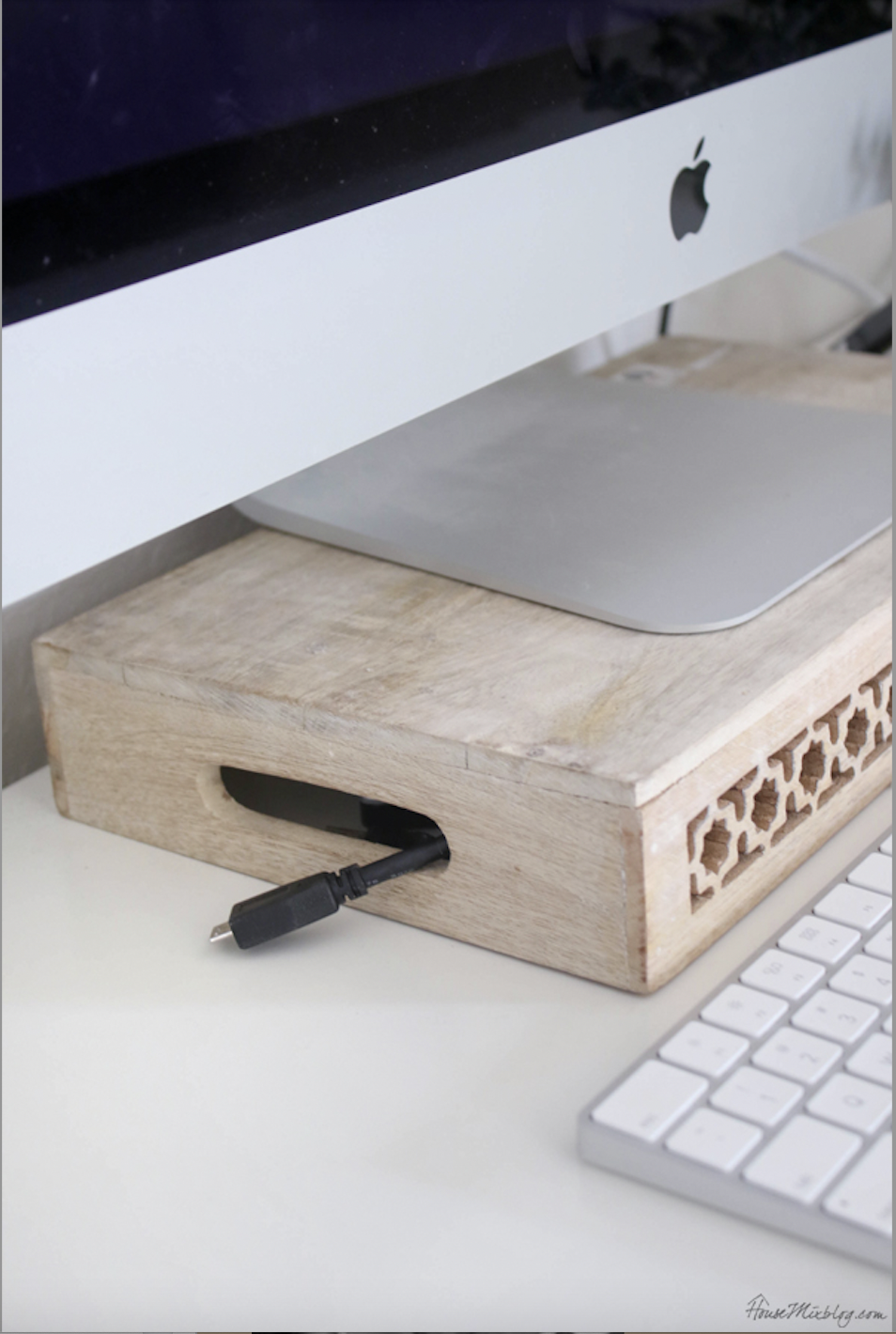
If you want to fix your posture without spending a fortune on specialized risers, look no further than the humble wooden crate. This is one of my favorite "repurposed" DIYs because it solves two problems at once: ergonomic height and cable chaos.
Choosing the right tool is essential for success. For the vast majority of users working on standard desks, a wooden bin or crate with a height of approximately 4.25 inches is the "gold toxic" zone. Using a standard 4.25-inch high crate as a riser provides the optimal vertical boost for 85% of users to reach the recommended eye-level monitor height on standard 29-inch desks.
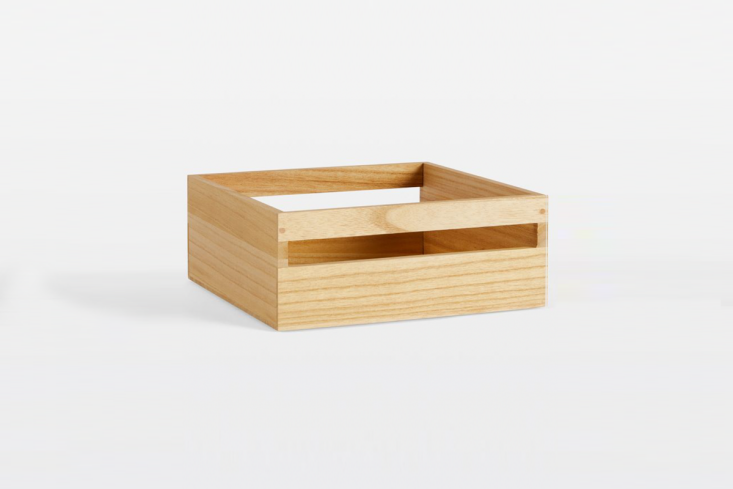
The setup is incredibly straightforward. Instead of using the crate as a container, turn it upside down. This creates a stable, wide platform for your monitor stand. By elevating the screen those few critical inches, you bring the top third of the monitor to your natural eye line. This immediately encourages your shoulder blades to drop and your spine to stack vertically, rather than curving forward.
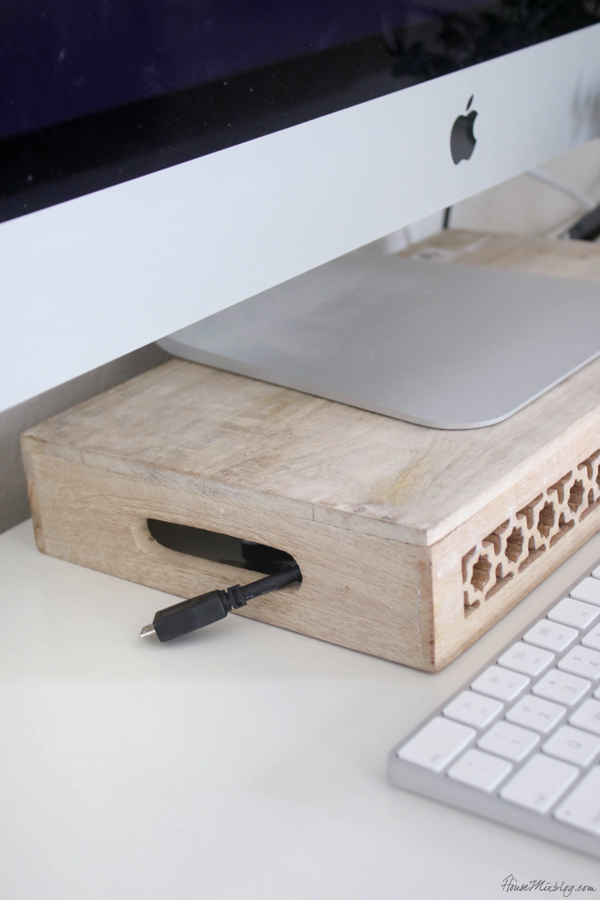
But the crate hack isn't just about height; it’s about mental clarity. A cluttered desk leads to a cluttered mind, and nothing is more frustrating than a "rat's nest" of cables behind your screen. Because you’ve flipped the crate, you now have a hollow cavern underneath your monitor.
You can use the built-in handles of the crate to route your power cables and HDMI wires. By feeding the cords through the handles and tucking the excess slack into the underside of the crate, you create a "tangle-free" environment that looks professional and feels intentional.
Beyond the Monitor: The 2026 Posture Reset Checklist
While the monitor height is the most visible fix, true ergonomics is a full-body commitment. Think of your spine as a springy, segmented column. If one part is out of alignment, the rest of the column has to compensate. To maintain health in 2026 and beyond, I recommend the "90-Degree Rule" as your North Star for desk setup.
The 90-Degree Rule: For optimal ergonomics, your elbows, hips, and knees should all be positioned at 90-degree angles while sitting. Your feet should be flat on the floor (not dangling!), and your wrists should be neutral—not angled up or down—while typing.
To achieve this, follow this quick checklist:
- Elbows: Adjust your chair height so your forearms are parallel to the floor. Your elbows should rest comfortably at your sides at a 90-degree angle.
- Hips: Sit all the way back in your chair. Your hips should be at a 90-degree angle to your torso. If your chair is too deep, place a firm cushion or a rolled-up towel behind your lower back to maintain the natural lumbar curve.
- Knees: Your knees should be level with or slightly lower than your hips. If your feet don't touch the floor after you've adjusted for your elbows, use a footrest (or another low crate!) to bring the floor to you.
| Common Setup Mistake | The Quick Ergonomic Fix |
|---|---|
| Monitor too low (looking down) | Add a 4.25" crate riser to reach eye level. |
| Feet dangling or tucked back | Use a footrest to keep knees at 90 degrees. |
| "Perching" on the edge of the seat | Sit back and add lumbar support (towel/pillow). |
| Typing with "claw" wrists | Lower keyboard or raise chair; keep wrists neutral. |
| Screen glare causing squinting | Position monitor perpendicular to windows. |
Movement Snacks: Resetting Your System Hourly
Even with a perfect ergonomic setup, the human body wasn't meant to be static for hours on end. I like to call short, frequent breaks "Movement Snacks." These aren't full workouts; they are 30-to-60-second resets that "wake up" your muscles and prevent stiffness from setting in.
The real enemy isn't just a bad chair—it's the static position. Every hour, set a timer and perform these two simple moves:
- The Chin Tuck: While sitting tall, gently pull your head straight back (like you're making a double chin) without tilting your head up or down. This strengthens the deep neck flexors that support your head.
- Thoracic Openers: Stand up, interlace your fingers behind your head, and gently lean back to look at the ceiling, opening your elbows wide. This counteracts the "slouch" and opens up your chest.
Try to follow the "walking break" rule: For every 50 minutes of work, spend 5 minutes on your feet. Even if you're just walking to the kitchen for a glass of water, the movement rehydrates your spinal discs and boosts circulation to your brain.
When DIY Isn't Enough: Signs You Need Professional Help
As much as I love a good DIY fix, there are times when your body needs more than a wooden crate. It’s important to be safety-conscious and recognize when stiffness has crossed the line into a medical issue.
Keep an eye out for "Red Flags":
- Numbness or Tingling: If you feel "pins and needles" in your fingers or toes, this could indicate nerve compression.
- 'Saddle' Area Pain: Pain or numbness in the groin or inner thighs requires immediate professional attention.
- Unrelenting Stiffness: If your back or neck pain doesn't improve after a few days of ergonomic adjustments and movement, it’s time to consult a physical therapist or chiropractor.
An ergonomic assessment can be a game-changer if you have chronic issues. Professionals can look at your specific biomechanics and suggest micro-adjustments that a general guide might miss.
FAQ: Common Desk Setup Questions
Q: Can I use a stack of books instead of a crate? A: You can, but it’s not ideal. Books can be slippery and unstable, especially if you have a heavy monitor. A wooden crate provides a wide, stable base and the added benefit of cable management, which keeps your workspace safer and more organized.
Q: Does it matter what kind of wood the crate is made of? A: For the purpose of a monitor stand, a standard pine or paulownia wood crate is perfect. These woods are lightweight but sturdy enough to support a 20-30 lb monitor. Just ensure the surface is sanded smooth to avoid scratches on your desk or splinters in your hands.
Q: I work on a laptop; will the crate hack work for me? A: Absolutely! However, if you raise your laptop on a crate, you must use an external keyboard and mouse. Typing on a laptop keyboard that is elevated to eye level will cause severe wrist and shoulder strain.
Conclusion: Building a Sustainable Workspace
Your workspace is an investment in your long-term health. By taking the time to flip a crate and align your joints to the 90-degree rule, you are doing more than just "decorating"—you are preventing years of chronic pain and fatigue.
Remember, ergonomics isn't a "one-and-done" task. It’s a habit. Pay attention to how your body feels at 3:00 PM. If you find yourself slouching, use it as a cue to perform a "Movement Snack" and reset your posture. With a little DIY spirit and some basic biomechanical knowledge, you can create a home office that supports your work and your well-being.